NOVANOMADER

COLLABORATIVE FEATURE

UX RESEARCH & CORE EXPERIENCE

UX RESEARCH & CORE EXPERIENCE

Reducing cognitive load in a complex decision journey

product design

UX research

user test

November 2025

WHAT IT IS

A mobile application that helps users build a trip itinerary through swipe-based interactions and AI recommendations.


This part of the project focused on improving the core user journey, making travel planning clearer, more structured, and easier to navigate.

OBJECTIVES

NovaNomader already provided an intuitive concept, but key steps in the journey lacked clarity and structure, leading to hesitation and cognitive overload.


Improving this core experience was essential to reduce friction throughout the process.

MY ROLE

UX/UI Designer


Conducted UX research and audit of the existing journey. Identified key friction points in decision-making and planning logic. Redesigned core flows to improve clarity, structure, and user guidance.

NOTE:

The screens shown throughout this case study are intentionally low-fidelity wireframes. The focus of my work was on understanding user needs, identifying friction points, and improving the overall experience through UX research and interaction design rather than visual design.

USER TESTING

Primary users
  • Individuals planning a trip and looking for inspiration or guidance

  • Travelers overwhelmed by too many options and sources of information

  • Users with limited time who want to plan efficiently without sacrificing experience

Testing set up

When I joined NovaNomader, user testing was already underway.


Method :

  • Orange incubator workshops + independent testing

  • Task-based scenarios (discovering, planning, editing, budgeting)

  • Qualitative feedback collection

  • Insight clustering & prioritization

5 / 5 — WHAT WORKED

  • A strong and engaging concept

Users immediately understood and appreciated the idea

  • An intuitive and fluid experience

Navigation and onboarding felt natural 

  • An enjoyable exploration phase

The swipe interaction created engagement and curiosity

“Great interface, fun concept, with a warm and human tone”

User test participant

Users liked discovering destinations. The entry point worked.

4 / 5 — WHAT NEEDED IMPROVEMENT

1. RETHINKING BUDGET AS A FLEXIBLE DECISION

  • Budget perceived as unclear, unrealistic, or too high

  • Difficulty estimating costs for an unknown destination

  • Fear of “setting it too low” and missing out

  • Too many variables to calculate (transport, housing, activities…)

“The estimated budget feels too high”

User test participant

Core issue : Asking users for a precise budget early in the journey created friction and uncertainty.

I first analyzed platforms like Evaneos, Airbnb & Booking to understand common patterns.

1

Evaneos :

  • Total budget per person : ideal & maximum

  • A more personal and flexible approach that accounts for potential overspending

2

AIrbnb :

  • Budget as a price range for the entire stay (min / max slider)

  • Provides a global and flexible overview of spending

1

Booking :

  • Budget per night (min / max slider)

  • More precise, but focused on a single expense category (accommodation)

KEY OBSERVATIONS

Budget is rarely asked upfront

Most platforms only display pricing after destination and dates are defined

Range-based inputs are preferred

Sliders (min/max) are widely used → simple, intuitive, no calculation needed

Budget is contextual, not absolute

Prices are tied to: location, type of accommodation & duration

Budget is not an entry input, it’s a result of context.

I first analyzed platforms like Evaneos, Airbnb & Booking to understand common patterns.

1

Evaneos :

  • Total budget per person : ideal & maximum

  • A more personal and flexible approach that accounts for potential overspending

2

AIrbnb :

  • Budget as a price range for the entire stay (min / max slider)

  • Provides a global and flexible overview of spending

1

Booking :

  • Budget per night (min / max slider)

  • More precise, but focused on a single expense category (accommodation)

KEY OBSERVATIONS

Budget is rarely asked upfront

Most platforms only display pricing after destination and dates are defined

Range-based inputs are preferred

Sliders (min/max) are widely used → simple, intuitive, no calculation needed

Budget is contextual, not absolute

Prices are tied to: location, type of accommodation & duration

Budget is not an entry input, it’s a result of context.

  1. LACK OF EFFECTIVE ONBOARDING

  • Too long & basic and not informative enough
    It didn’t provide meaningful guidance on how the product works

  • Perceived as intrusive
    Instead of helping, it felt imposed at the wrong moment

  • No flexibility
    Users couldn’t skip or control the tutorial

“Useful, but too basic, it almost felt like an instruction”

Core issue : The tutorial didn’t support the experience, it interrupted it without adding real value.
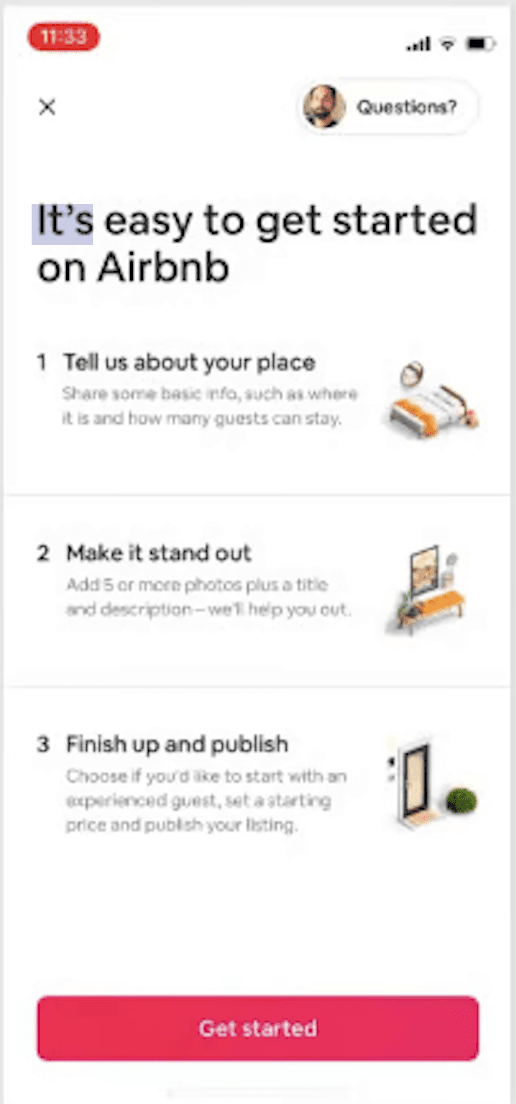
I analyzed products combining onboarding, discovery, and progressive learning experiences: Airbnb, Bumble, Hopper, and Headspace.

1

Airbnb :

  • Minimal onboarding focused on getting started

  • No obligation to consume information before starting

  • Help and tutorials remain accessible through the help center

  • Users learn at their own pace.

2

Bumble :

  • Lightweight onboarding

  • Critical interactions explained when they first occur (swipe)

  • Tutorial remains accessible through a dedicated help section

  • Actions are learned through practice, not through reading.

3

Hopper :

  • Minimal (3 steps) and skippable onboarding

  • Contextual tips and pop-ups displayed during the journey

  • Guidance appears when users actually need it.

4

Headspace :

  • Short onboarding focused on value and personalization

  • Users provide information while progressing through the flow

  • The onboarding itself becomes part of the experience.

KEY OBSERVATIONS

Onboarding should stay lightweight

Users have low attention at the beginning of a journey. The onboarding should provide reassurance and direction, not explain every feature.

Learning happens during action

The most effective products explain features when users encounter them, not before.

Help should remain accessible

Users should always have a way to revisit explanations later without restarting the onboarding.

Onboarding is not a tutorial. Its role is to reassure users, communicate value, and get them started quickly. Feature learning should happen progressively, at the moment of action.
I analyzed products combining onboarding, discovery, and progressive learning experiences: Airbnb, Bumble, Hopper, and Headspace.

1

Airbnb :

  • Minimal onboarding focused on getting started

  • No obligation to consume information before starting

  • Help and tutorials remain accessible through the help center

  • Users learn at their own pace.

2

Bumble :

  • Lightweight onboarding

  • Critical interactions explained when they first occur (swipe)

  • Tutorial remains accessible through a dedicated help section

  • Actions are learned through practice, not through reading.

3

Hopper :

  • Minimal (3 steps) and skippable onboarding

  • Contextual tips and pop-ups displayed during the journey

  • Guidance appears when users actually need it.

4

Headspace :

  • Short onboarding focused on value and personalization

  • Users provide information while progressing through the flow

  • The onboarding itself becomes part of the experience.

KEY OBSERVATIONS

Onboarding should stay lightweight

Users have low attention at the beginning of a journey. The onboarding should provide reassurance and direction, not explain every feature.

Learning happens during action

The most effective products explain features when users encounter them, not before.

Help should remain accessible

Users should always have a way to revisit explanations later without restarting the onboarding.

Onboarding is not a tutorial. Its role is to reassure users, communicate value, and get them started quickly. Feature learning should happen progressively, at the moment of action.

3. IDENTIFYING KEY USER FRICTION POINTS

Some core features were not understood or were misinterpreted :

  • Credit system perceived as confusing and frustrating

  • Filters missed structure before exploration

  • Checklist (suitcase) unclear (quantities, meaning of actions)

Core issue : Users didn’t understand the rules of the system.

USER RESEARCH

User testing revealed that the filter page was creating friction before users even entered the core experience.

1

Difficulties to understand and complete the setup

Departure and return dates were misunderstood

The departure city field lacked expected behaviors such as autocomplete

The CTA “I already know where I want to go” was unclear

“I wasn’t sure which option I was supposed to choose.”

Core issue : Users lacked clarity before the journey even started.

2

More control wanted over the type of trip generated

Desire for travel styles and moods

Need for different travel rhythms

Expectation of a more personalized experience

“I like the idea of travel moods, such as wandering or relaxation.”

Core issue : Users wanted to express intentions, not just logistics.

3

Some constraints felt arbitrary

A few restrictions created frustration and reduced confidence.

Trip duration limits were perceived as a bug

Some users felt blocked by predefined constraints

“I thought it was a bug when I couldn’t plan more than 9 days.”

Core issue : Constraints were not clearly explained and felt imposed.

Key observation

Users expected a more personalized experience and wanted to express the type of trip they had in mind, not just provide logistical information.

The filter page lacked clarity, creating hesitation before users could even start exploring destinations.

Users needed more guidance to define their preferences and translate them into a meaningful travel experience.

The filter page should not only collect trip parameters, it should help users express their travel intentions while providing a clear and reassuring starting point.

UX DESIGN DECISION

Before

  • Unclear date selection and trip constraints.

  • Confusing destination selection flow.

  • Vague travel pace.

  • Key features (choice of destination) lacked explanation.

After

I redesigned the screen with 4 modifications:

1

Added departure city autocomplete to reduce friction and align with common travel app patterns.

2

Clarified destination selection with a dedicated block explaining how NovaNomader helps users find a destination.

3

Introduced date confirmation feedback to reassure users and validate their travel period.

4

Refined travel pace wording by replacing vague labels with clear activity-based descriptions (Relaxed, Balanced, Dynamic).

USER RESEARCH

User testing revealed that the filter page was creating friction before users even entered the core experience.

1

Difficulties to understand and complete the setup

Departure and return dates were misunderstood

The departure city field lacked expected behaviors such as autocomplete

The CTA “I already know where I want to go” was unclear

“I wasn’t sure which option I was supposed to choose.”

Core issue : Users lacked clarity before the journey even started.

2

More control wanted over the type of trip generated

Desire for travel styles and moods

Need for different travel rhythms

Expectation of a more personalized experience

“I like the idea of travel moods, such as wandering or relaxation.”

Core issue : Users wanted to express intentions, not just logistics.

3

Some constraints felt arbitrary

A few restrictions created frustration and reduced confidence.

Trip duration limits were perceived as a bug

Some users felt blocked by predefined constraints

“I thought it was a bug when I couldn’t plan more than 9 days.”

Core issue : Constraints were not clearly explained and felt imposed.

Key observation

Users expected a more personalized experience and wanted to express the type of trip they had in mind, not just provide logistical information.

The filter page lacked clarity, creating hesitation before users could even start exploring destinations.

Users needed more guidance to define their preferences and translate them into a meaningful travel experience.

The filter page should not only collect trip parameters, it should help users express their travel intentions while providing a clear and reassuring starting point.

UX DESIGN DECISION

Before

  • Unclear date selection and trip constraints.

  • Confusing destination selection flow.

  • Vague travel pace.

  • Key features (choice of destination) lacked explanation.

After

I redesigned the screen with 4 modifications:

1

Added departure city autocomplete to reduce friction and align with common travel app patterns.

2

Clarified destination selection with a dedicated block explaining how NovaNomader helps users find a destination.

3

Introduced date confirmation feedback to reassure users and validate their travel period.

4

Refined travel pace wording by replacing vague labels with clear activity-based descriptions (Relaxed, Balanced, Dynamic).

4. ADDITIONAL IMPROVEMENTS

Beyond the major redesigns, user testing also revealed several smaller friction points that impacted the overall experience. I addressed a few of these through targeted improvements focused on control, feedback, and visibility.

1

Improve itinerary editing

Users struggled to discover how to edit their itinerary and wanted more flexibility once the trip was generated.


Improvements :

  • Made the Edit itinerary action more visible with a clearer CTA

  • Introduced drag & drop to reorganize activities and days

2

Transform waiting into engagement

Users often perceived itinerary generation as slow and sometimes assumed the app had frozen.


Changes :

  • Added dedicated loading screens

  • Introduced travel-themed content during waiting times

  • Displayed fun facts, “Did you know?” insights, and NovaNomader tips while the itinerary was being generated

3

Organize trip management

Users didn’t always know where they were in the travel creation process and had limited control over existing trips.


Changes :

  • Added status indicators to display the current stage of each trip

  • Made unfinished journeys easier to identify and resume

  • Added quick actions to view or delete existing trips

RETROSPECTIVE

A recurring pattern emerged throughout the project: users were rarely blocked by a lack of features, but by a lack of clarity.


Most improvements focused on making the product easier to understand, navigate, and trust, whether through better onboarding, clearer budgeting, improved feedback, or more explicit interactions.


The experience reinforced a principle I now apply consistently: the most valuable product improvements are often the ones that reduce friction rather than add functionality.

2026 BY INÈS MATHOREL. ALL RIGHTS RESERVED.

Made from scratch

2026 BY INÈS MATHOREL. ALL RIGHTS RESERVED.

Made from scratch

Create a free website with Framer, the website builder loved by startups, designers and agencies.